The margin on every job, every day.
Know, job by job, how much you contracted, how much you have spent and how much you will earn, without filling in Excel sheets again. Supplier invoices are read by artificial intelligence and linked to the right job.
The application interface and the sample documents shown here are in Portuguese.

The problems it solves
How it works
Invoices arrive
By email, as a photo or from the invoicing software.
AI reads and files them
Each document is linked to the right job, supplier and customer. Anything in doubt is left for a person to confirm.
The margin appears
Per job and for the whole company, always up to date.
The essentials
Jobs and margins
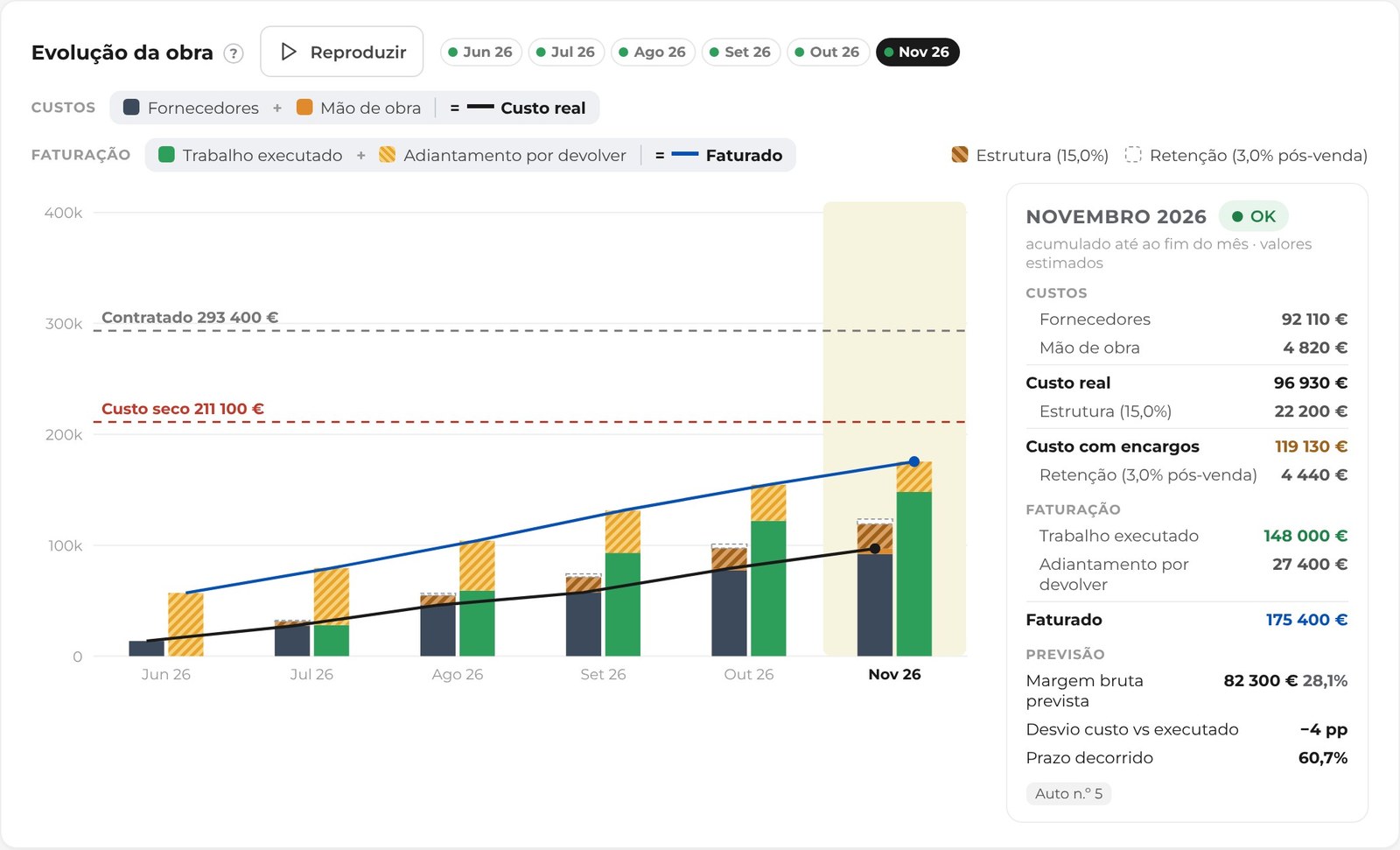
Each job with its contract value, expected cost and gross, real and net margins.
- Real cost updated with every invoice, hour worked and expense
- Month-by-month progress: costs, work done and amount invoiced
- Extra work, advances and retentions handled separately
Supplier invoices, read by AI
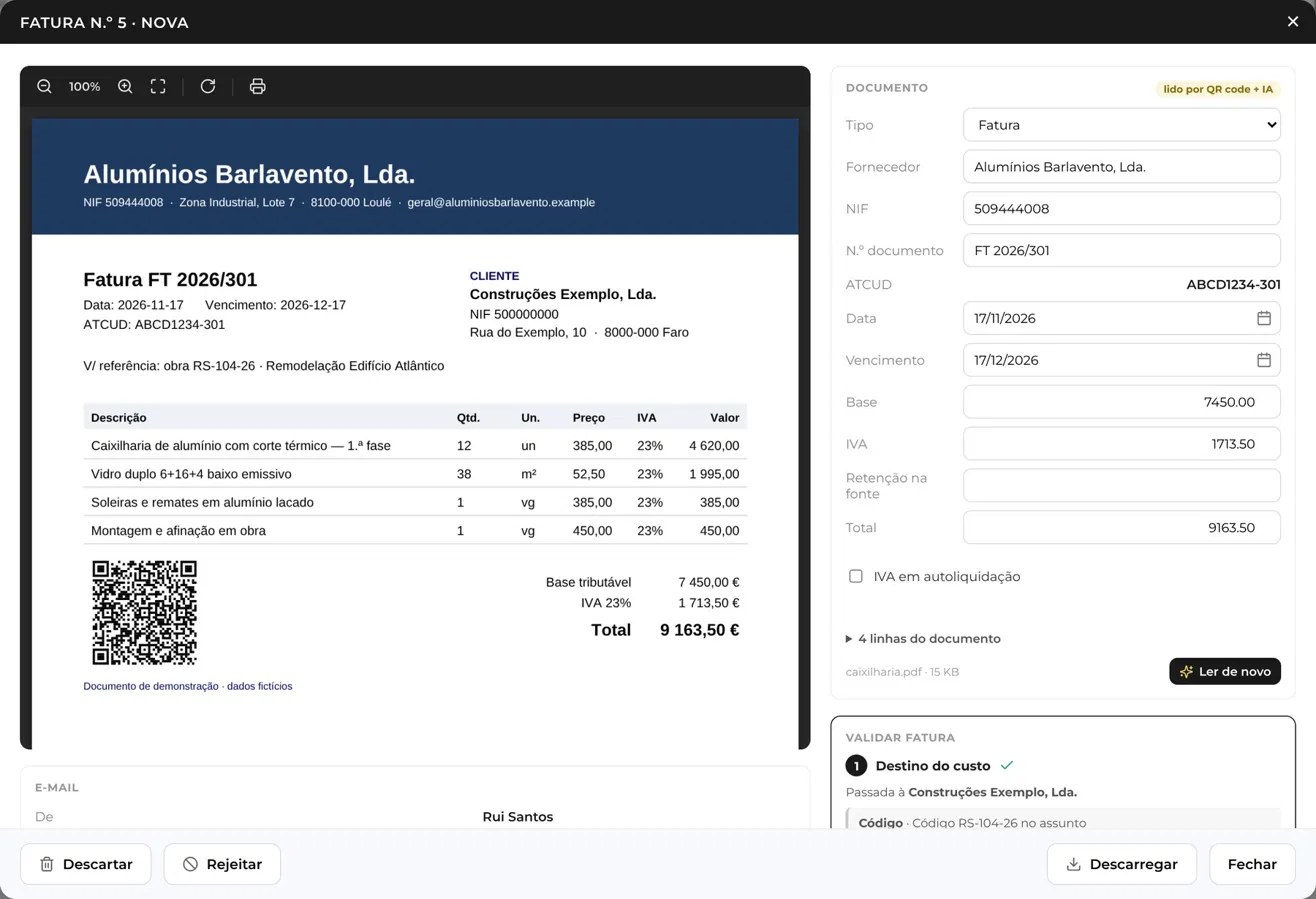
The supplier or the site manager emails the invoice and it appears in the application, already filled in.
- Supplier, tax number, dates, amounts and VAT read from the document
- Amounts checked against the invoice’s QR code
- Duplicate detection and an approval workflow
Subcontracts
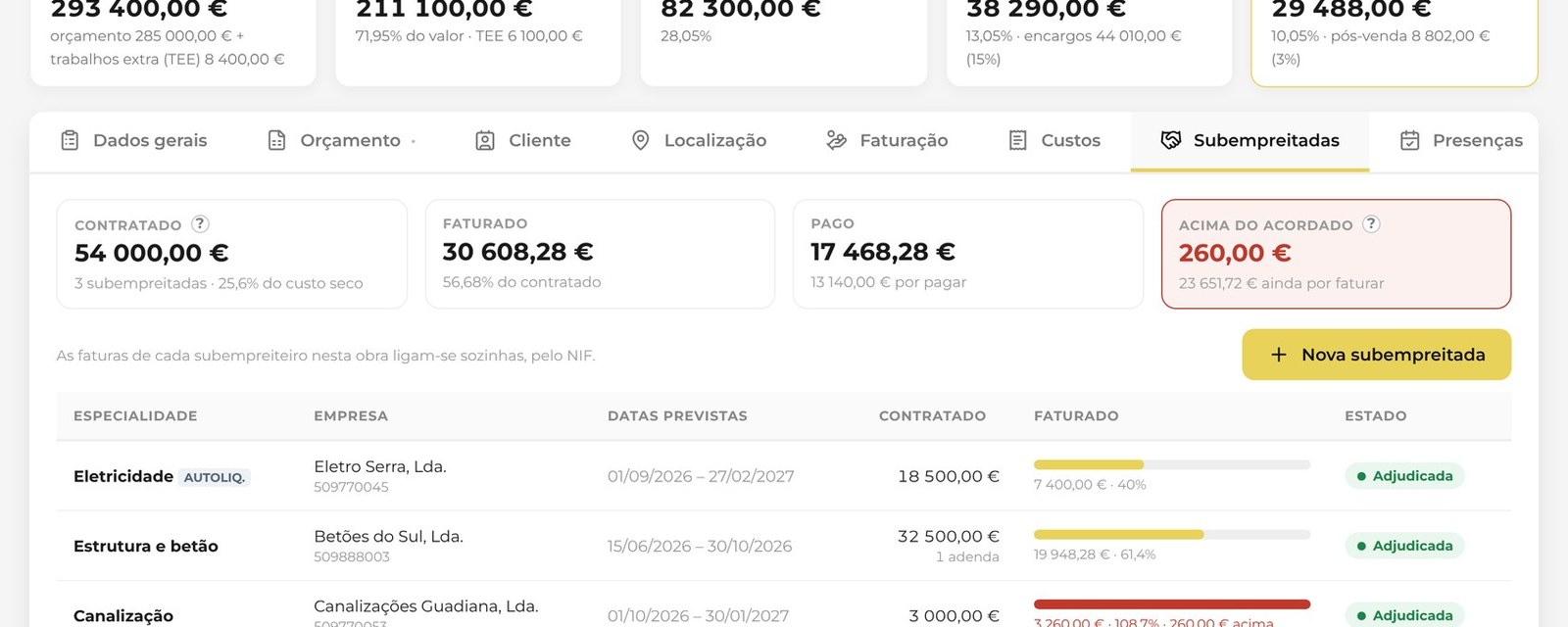
One contract per trade, with the agreed amount, the amendments and the dates.
- Invoiced and paid amounts calculated from the actual invoices
- A warning and a hold when an invoice goes over what was agreed
For management
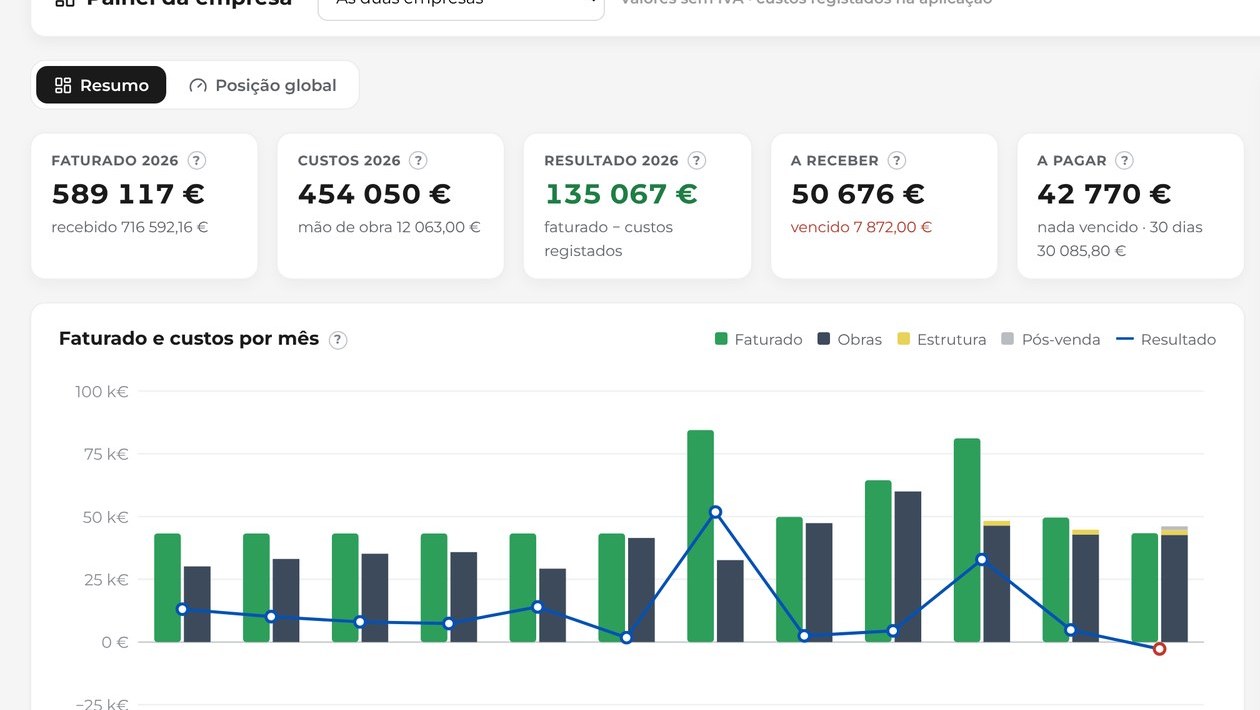
The whole company on one dashboard: invoiced, costs, result, receivables and payables.
- Monthly meeting always ready, with one page per job
- Questions in plain language about your own data
- Weekly summary by email and cost alerts
With your company’s brand
The application’s colours and logo are customised to your company’s branding, on screen and in the PDF reports.
Ask in plain language. The answer comes with the workings.
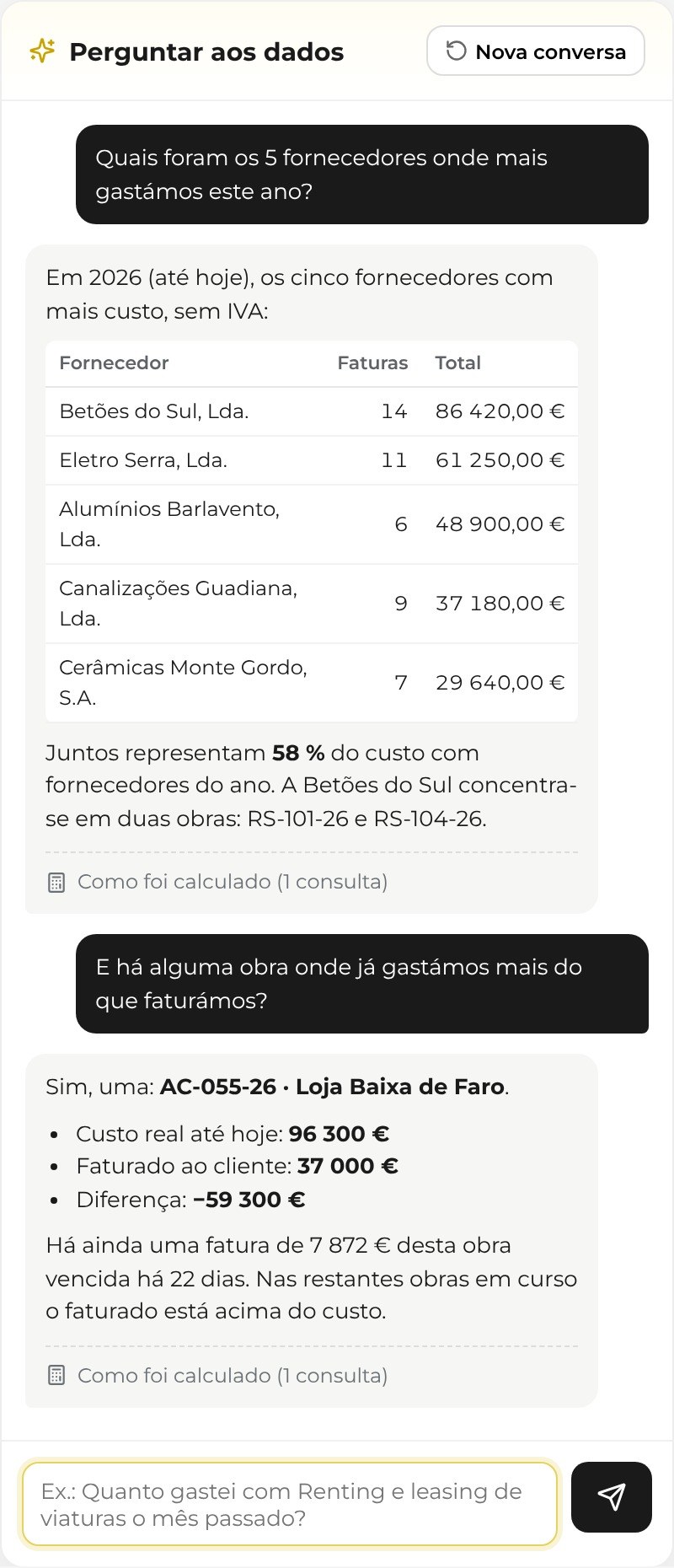
On the company dashboard there is a box where the manager types a question as they would ask a colleague: "Which suppliers did we spend the most with this year?" or "Is there any job where we have already spent more than we have invoiced?". The application goes to the real data on jobs, invoices and attendance, does the sums and answers in text, with a table when it makes sense.
- No reports or filters: you type the question and that is it.
- Follow-up questions: you can dig into the previous answer without repeating the context.
- Workings in view: each answer shows "How it was calculated", with the data and the filters used. The AI interprets the question; the numbers come from the application.
All features
Customer invoices and payments received
- Connection to Moloni: invoices, credit notes and receipts arrive on their own, every hour
- Progress valuations, invoiced, received, outstanding and overdue amounts, per job and in total
- A job can be invoiced to different entities
Labour
- Weekly attendance sheet per site manager, with hours per worker and per job
- Each worker’s hourly cost applied automatically to the cost of the job
- Holidays, absences and leave, with email reminders
Cards and overheads
- Company card statements imported and allocated to jobs
- Overheads shared across jobs as a percentage
- After-sales: a reserve per job and warranty costs kept separate
Records up to date
- A rating from 0 to 5 stars shows whether each site manager submits attendance, invoices and expenses on time
Security and control
- Different profiles for management, office staff and site managers
- Change history on every job, invoice and customer
- Daily backups and an access log
- Data hosted in the European Union
What sets it apart
Built for Portuguese construction
Reverse-charge VAT, progress valuations, retentions, subcontracts, tax numbers and invoice QR codes.
It does not replace what already works
It connects to Moloni and to the email the company already uses.
AI does the work, people decide
Nothing is paid or counted without a person checking it.
Quick to start
Jobs in progress are loaded from the control spreadsheet the company already has.
Do you use the AI Estimating Assistant? The estimate can be attached to the job.
Frequently asked questions
Does it replace my invoicing software?
No. Invoices are still issued in your certified software; the application fetches them from there.
Does it replace the accounts?
No. It is management control: it shows the margin on each job. The official accounts stay with your accountant.
Does the AI make mistakes?
It can, which is why every invoice goes through a check before it counts. When the document has a QR code, the amounts are checked against it.
Do site managers have to learn a complicated program?
No. They see only their own jobs and do three things: record attendance, send invoices and follow subcontracts. It works on a phone.
Where is the data kept?
In the European Union.
Know today what you would only find out at the end of the job.
Request a demo: we show you the application with sample data and talk about your jobs.